
Download BPBible Portable – Bible Study, Scripture Analysis, Portable Access
Overview
BPBible Portable is a specialized mobile application designed to support Christians in deepening their understanding of scripture through structured biblical analysis. Unlike conventional Bible reading apps, BPBible Portable emphasizes portability, flexibility, and academic rigor, making it a unique tool in the religious software ecosystem. Its primary purpose is to serve as a customizable, on-the-go study platform for individuals engaged in serious biblical research, theological study, or personal devotion. The app does not include any biblical texts by default, which allows users to maintain control over their content choices while enabling the integration of various translations, commentaries, and reference materials.
Target users include theology students, pastors, Christian educators, and committed lay readers who value scholarly depth and the ability to study across multiple devices without installation. The application’s portable design enables it to run directly from USB drives, iPods, or portable hard drives, making it ideal for users who need consistent access to their study materials regardless of the host device. This feature is particularly valuable in academic or mission environments where installing software may be restricted. Although the developer did not provide additional technical details, the app’s long-standing presence since 2013 suggests a dedicated user base seeking reliable, lightweight tools for scriptural engagement.
Key Features & Functionality
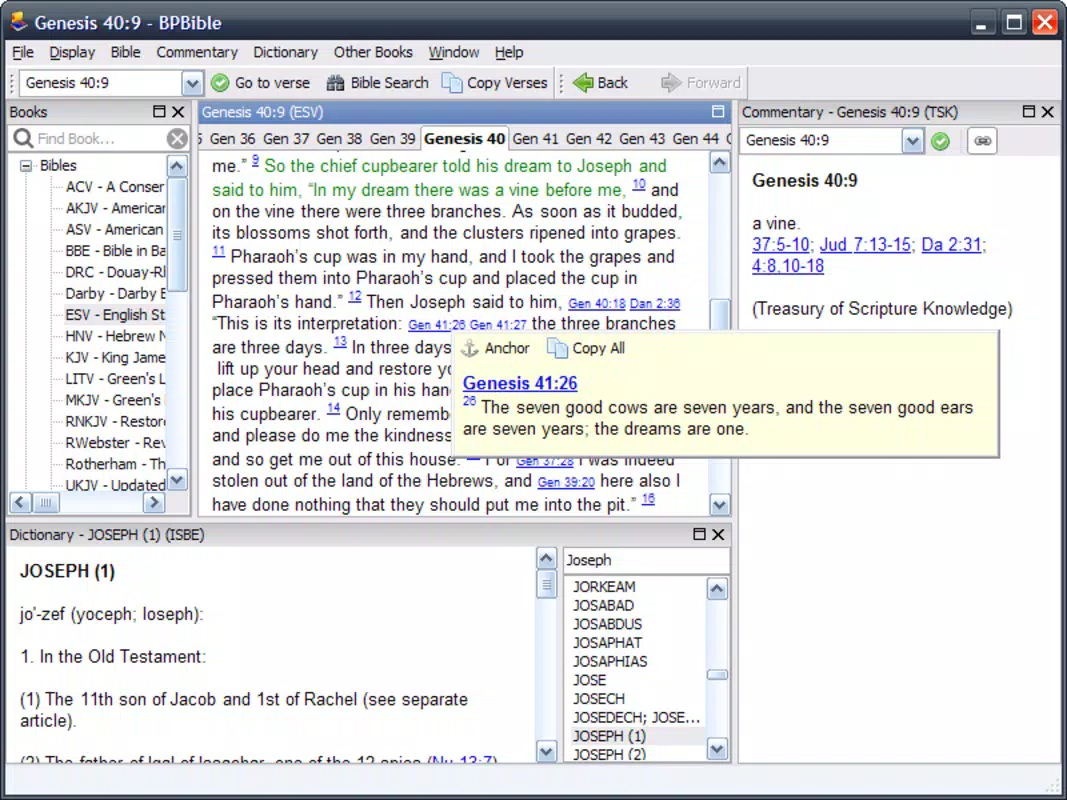
- User-Friendly Interface: The app features a clean, organized layout that prioritizes usability. Navigation is streamlined to minimize distractions, allowing users to focus on scripture rather than technical complexity. This intuitive design supports both beginners and experienced users, reducing the learning curve for new adopters.
- Flexible Component Downloads: Users can download additional biblical texts, commentaries, and glossaries directly within the application. The ability to drag and drop files into the interface simplifies content integration, enabling users to build a personalized study library tailored to their specific needs.
- Portable Storage Solutions: BPBible Portable is designed to run from external storage devices such as USB drives and iPods. This eliminates the need for installation and allows seamless access to study resources across different computers or devices, enhancing mobility and accessibility.
- Focused Study Tools: The application supports in-depth analysis through tools that promote interpretation, cross-referencing, and contextual understanding. These features are not merely supplementary—they are central to the app’s design, positioning it as a resource for serious academic and devotional study.
For example, a theology student preparing for a sermon can load a specific commentary and translation onto a USB drive, access the app on a library computer, and conduct a thorough analysis without relying on internet connectivity. Similarly, a missionary traveling between regions can carry their entire Bible study toolkit on a portable drive, ensuring consistent access to critical resources.
Interface, UX & Performance
BPBible Portable presents a minimalist interface with a clear visual hierarchy, emphasizing content over decorative elements. The layout is structured to support efficient navigation between books, chapters, and references, with a focus on reducing cognitive load during study sessions. Users can expect a straightforward workflow: launch the app, load desired resources, and begin analysis—without requiring extensive configuration.
Although the developer did not list formal performance metrics, the application’s lightweight nature and portable execution model suggest stable operation across a range of devices. The app is designed to function without installation, which typically correlates with lower system resource usage. Responsiveness appears to be consistent, especially when operating from fast storage media such as USB 3.0 drives. Stability is likely maintained through a modular architecture that isolates core functions from external content, minimizing crashes due to corrupted or incompatible files.
Users may experience slight delays when loading large commentary files, but this is typical for applications that rely on local file access. The absence of cloud synchronization or background processes further contributes to predictable performance. Overall, the user experience is optimized for focus and continuity, aligning with the app’s core mission of enabling uninterrupted study.
Platform Compatibility & Technical Requirements
BPBible Portable is designed for use on Windows-based systems, supporting various versions of the operating system. The application runs directly from portable storage devices, making it compatible with computers that have USB ports or compatible media readers. The file size is relatively compact, though exact dimensions were not disclosed by the developer.
The developer did not specify minimum OS requirements or exact compatibility details. However, given its release date in 2013 and continued availability, it is likely compatible with modern Windows versions, including Windows 10 and Windows 11, though users should verify system compatibility before deployment. No official support for macOS or Linux was indicated, and no mobile platform availability was mentioned. The application does not require administrative privileges to run, which enhances its usability in restricted environments.
Pros and Cons
Pros
- Portable execution enables use from USB drives, iPods, and external hard drives
- Supports customizable content through easy file integration via drag-and-drop
- Minimalist interface enhances focus during scripture study
- Designed for in-depth biblical analysis, not just reading
- Does not require installation, ideal for shared or restricted devices
Cons
- No built-in biblical texts; users must source and add content manually
- Developer did not provide detailed system requirements or compatibility information
- Limited to Windows-based systems; no official support for macOS or Linux
- May not support newer file formats or encryption standards
- Interface lacks modern design elements such as dark mode or touch optimization
FAQ
Is BPBible Portable free to download and use?
Yes, BPBible Portable is available for free. Users can download and use the application without cost, though additional content such as commentaries or translations must be obtained separately.
Can I use BPBible Portable on my Mac or Linux computer?
The developer did not provide official support for macOS or Linux. The application is designed for Windows-based systems and may not run on non-Windows platforms without additional compatibility layers.
How do I add Bible translations or commentaries to BPBible Portable?
Users can download additional resources and add them to the application by dragging and dropping files into the program’s interface. This method allows for easy integration of external content.
Is BPBible Portable secure to use on public or shared computers?
Yes, the portable nature of the app enhances security on shared devices. Since it runs from external storage and does not install system-wide, it leaves minimal traces and reduces the risk of data exposure.
Does BPBible Portable require an internet connection?
No, the application operates offline. Once content is added, users can access and study scripture without an active internet connection, making it suitable for use in remote or low-connectivity environments.
Final Thoughts
BPBible Portable stands out as a focused, lightweight tool for serious biblical study, combining portability with academic functionality. Its ability to run from external storage devices makes it uniquely suited for users who need consistent access to their study materials across different machines—ideal for students, pastors, and missionaries. While it lacks built-in content and does not support modern operating systems beyond Windows, its core strengths lie in customization, privacy, and uninterrupted study flow.
For individuals seeking a reliable, no-frills Bible study companion that prioritizes depth over convenience, BPBible Portable remains a compelling choice. Its long-standing presence in the Christian software space speaks to its enduring value. If you’re looking for a secure, portable, and customizable way to engage with scripture, this app delivers on its promise.
Download BPBible Portable now


